Function Introduction
AutoRunner Process automatically creates process scripts by recording user operations. This makes script creation quick and easy, eliminating the need for complex editing.
The advantage of recording scripts is that it significantly reduces script creation time, improves work efficiency, and reduces maintenance costs.
Using natural language scripting makes complex operations clear and understandable.
Edit natural language scripts by dragging and dropping and filling in parameters.
Supports components from various technical frameworks, internal functions, predefined process calls, common processes (methods), and programming language control flow (if-else, while, expressions, etc.).
AutoRunner Process automates process processing by converting natural language scripts into Java BeanShell scripts for execution. Users do not need to understand BeanShell scripts; they only need to maintain the natural language scripts.
The advantage of natural language scripts is that non-IT technicians can also write and maintain their own business processes.
For complex business logic processing and calculations, such as fee calculation algorithms, JavaScript is provided.
Unlike many scripting languages, AutoRunner Process integrates natural language scripting with JavaScript. It uses JavaScript for storage and natural language scripting for usage, editing, and interactive experience.
The core of the technology lies in the fact that AutoRunner Process has a built-in Java syntax compiler that compiles JavaScript syntax into natural language for display, providing various editing operations. All stored JavaScript is JavaScript.
For multiple execution tasks, the product provides a robot management server. This server utilizes a B/S architecture and can be accessed from anywhere. You can also set robot permissions and aliases, allowing you to assign business processes to different robots.
Robots can schedule and time their execution, set execution data and execution counts, and view execution logs.
The robot's execution process can be logged by taking screenshots, recording videos, and more.
If an abnormal operation occurs, the execution video can be viewed to analyze the problem.
Business Process Mining is a suite within AutoRunner Process. It helps users extract and discover high-frequency business processes from business operation logs, and then analyzes whether they should be automated. This significantly improves business execution efficiency and serves as an auxiliary workforce for business personnel.
Learning Videos
 Help DocumentationVersion Update
1. The newly added public object library module in RPA enables object sharing between scripts. Objects can be reused simply by importing them from the public object library, eliminating the need to repeatedly record the same objects and significantly saving recording time.
2. The built-in Google Chrome browser in the RPA tool integrates and calls the core capabilities of the Playwright framework, enabling automated control of the Chrome browser.
3. In automation scenarios, when AI generates automation instructions by analyzing business requirements or user intent, it does not directly generate unrelated operation code. Instead, it actively associates and calls objects from the pre-defined "object library," ensuring the accuracy, stability, and reusability of the instructions.
4. Users can move process nodes by dragging or repositioning them, directly modifying the "parent-child relationship" and "sibling order" of nodes in the process structure. This allows for flexible restructuring of process logic without deleting and recreating nodes or manually adjusting code.
5. Users can adjust the task execution order by dragging and dropping. This allows users to adjust the task execution queue in real time through a visual method of long-pressing and dragging with the mouse, without relying on code configuration or complex form operations.
6. Function Description: This is a decentralized task allocation mechanism. It eliminates the need for users to manually specify executors; instead, the system automatically identifies and assigns tasks to currently idle executors.
7. Function Description: Adds AI-powered key information extraction commands. By analyzing visual information in images using AI technology, it automatically generates executable automation commands.
8. Adds JSONPath value retrieval commands. Building upon AI's image recognition commands, the addition of JSONPath value retrieval commands further enhances the data processing capabilities of automated workflows, creating a closed loop from "interface operation" to "data extraction and parsing." This feature allows AI to not only generate interface interaction commands such as clicks and inputs but also automatically generate structured data extraction commands based on JSONPath, significantly improving the efficiency of building data processing automation workflows.
9. When outputting information (such as data analysis results, process descriptions, comparisons, and structured data summaries), AI can automatically organize scattered information into standardized tables or convert text content into tabular format according to user needs. This feature replaces "plain text listing" with "structured presentation", which greatly improves the readability, comparability and reusability of information, and is especially suitable for scenarios that require clear display of multi-dimensional and multi-item data.
App Store
This process automatically uses the Express 100 website to query logistics tracking numbers and saves the retrieved information to a local Excel file.

Based on the currency set in the parameter table, log in to the Bank of China foreign exchange rate website, obtain the latest exchange rate for the specified currency, and generate an Excel report.

Automatically logs into QQ and 163 mailboxes and automatically completes the email writing and sending process based on the configuration file, including adding recipients, entering the subject, filling in the body, adding attachments, and inserting images.

Automatically convert files of one format to another (not rename), currently supporting conversion between xls and xlsx, doc and docx formats

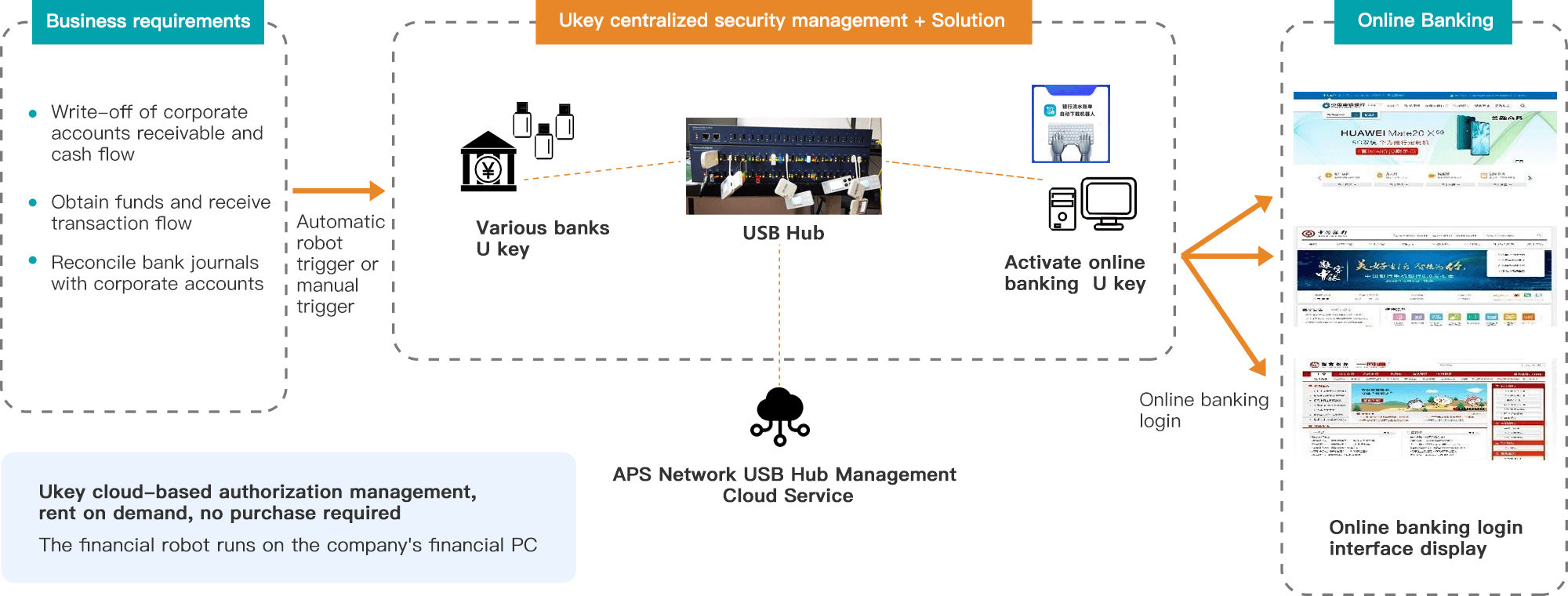
This process is an RPA script for downloading transaction details from the Agricultural Bank of China. The specific process involves using a USB key to log in to the Shanghai Bank corporate online banking system, query transaction details, and download the transaction details in xls format.
This process is an RPA script for downloading transaction details at Bank of China. The specific process involves using a USB key to log in to the Shanghai Bank corporate online banking system, query transaction details, and download the transaction details in xls format.
Expand cloud USB devices